Wedding Planner
Wedding planner spreadsheet: budget, guest list, seating and checklist for Excel and Google Sheets
Created by LogicExcel
English Instant download
See inside the template
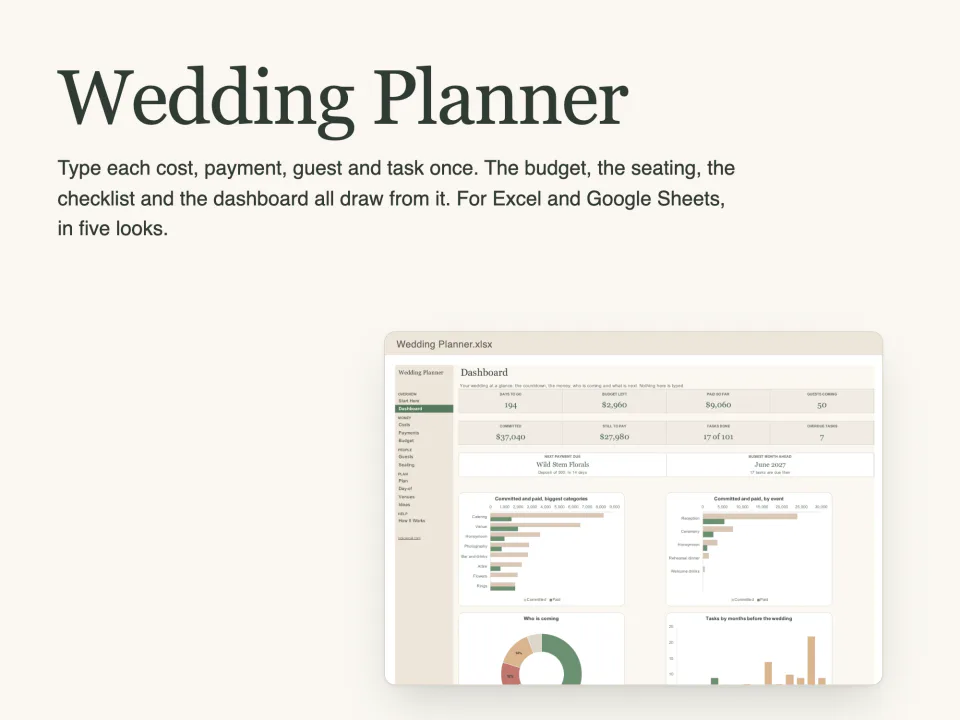
About this template
The LogicExcel Wedding Planner is a wedding planner spreadsheet for Excel and Google Sheets, for couples planning their own wedding and whoever is helping them. You type each cost, payment, guest and task once, and the Budget, the Dashboard, the seating cards and a 101-task checklist dated from your wedding day fill themselves in. It has 12 tabs and no macros. It comes in five colour themes as six Excel files: Sage, Blush, Emerald, Lumen and Midnight (dark), plus a Blank copy. A Google Sheets copy link is included.
What you will receive
- Six Excel files: five colour themes (Sage, Blush, Emerald, Lumen and Midnight, dark) and a Blank copy with the example cleared
- 12 tabs on one menu: Start Here, Dashboard, Costs, Payments, Budget, Guests, Seating, Plan, Day-of, Venues, Ideas and How It Works
- An example wedding with 69 guests, 21 costs and 12 payments filled in, so every tab works the moment you open it
- A starter plan of 101 tasks dated from your wedding day, each with a tip
- Room for 300 cost lines, 600 payments, 1,000 guests, 1,000 tasks and 40 reception tables, with a count of how much is used
- Dropdowns, ticks and formulas wired up, no macros, nothing to turn on
- Every main formula explained on How It Works, with the free lesson that teaches it
- A Google Sheets copy link: one click makes your own copy
- A setup guide (PDF) with every step and the answers to the questions couples ask
Made for
What is inside
A wedding planner spreadsheet for Excel and Google Sheets. You type each cost, payment, guest and task once, and the budget, the guest list and RSVPs, the seating, a checklist set from your wedding date and a dashboard all draw from it. It opens with an example wedding, so you can see it working before you make it yours.
How it works
Set up
On Start Here, type your two names, the wedding date, the day you started planning and your total budget. The first step turns green when the date and the budget are in.
Add your costs
On Costs, type each vendor or cost with an estimate. Add the agreed price, a deposit and its date, and the balance date as you learn them. Budget and the Dashboard move as you type. SUMIFS lesson
Type each payment
On Payments, add a row each time you pay a vendor. A refund is a minus. What is left to pay updates. SUM lesson
Add your guests
On Guests, type each guest once and set the RSVP. Plus-ones, meals and the headcount are counted for you. COUNTIFS lesson
Seat them (optional)
On Seating, name your tables and their seats, then pick a table for each guest on Guests. The cards fill themselves and turn red if a table is over. IF lesson
Work through the plan
On Plan, about 100 starter tasks are dated from your wedding day. Tick one when it is done, or type your own date to pin it. For the day, print Day-of. Date functions lesson
4.5 LogicExcel rating · 783 ratings
From learners on LogicExcel's lessons and courses, made by the same team as this template. The template is new, so it has no ratings of its own yet.
Actually fun and well designed.
Easy to follow, actually fun and well designed.
Beginner friendly.
Easy to follow.
Beginner friendly.
Beginner friendly, easy to follow and actually fun.
Built from these Excel functions
Each one has a lesson you can practise in a live spreadsheet: learn the functions behind this template.
Price, access and refunds
- $24.99 once, no subscription.
- Pay, download, and keep the link we email you to download it again whenever you need it.
- A download cannot be given back, so a template is not refundable once bought. The refund policy has the details.
Pairs well with
Set every bill once. Your calendar, paychecks and debt payoff fill themselves in.
Type each task once. Your day, week and month fill themselves in, with habits and a journal beside them.
Questions
Is this a wedding planner spreadsheet for Excel and Google Sheets?
Both. The download has six Excel files, five colour themes and a Blank copy, that use only functions Excel and Google Sheets share, and a link that makes your own Google Sheets copy in one click. There are no macros. How It Works lists the few small differences, such as how ticks and currency show.
What is in it?
12 tabs on one menu: Start Here, Dashboard, Costs, Payments, Budget, Guests, Seating, Plan, Day-of, Venues, Ideas and How It Works. It opens with an example wedding with 69 guests, 21 costs and 12 payments filled in, so every tab works the moment you open it.
How do I plan a wedding budget in it?
Type your total budget on Start Here. On Costs, add a line for each vendor with an estimate, then the agreed price, a deposit and its date, and the date the balance is due. On Payments, type each payment. Budget then shows every category and event: planned, estimate, agreed, paid, still to pay and what is left, with the next payments due.
How many guests and tables does it hold?
1,000 guests, 40 reception tables and 10 rehearsal dinner tables, and a table card names up to 20 seats. Costs holds 300 lines, Payments 600, Plan 1,000 tasks, Ideas 500 and Venues 6. Start Here shows how much of each is used and turns red at 90%.
Can two of us edit it together?
Yes. In Google Sheets, open your copy, choose Share and add their email or send a link. They need a free Google account to edit, and none to look if you set the link to Viewer. In Excel, save the file to OneDrive or a shared folder and share it from there. Two people typing in one Excel file at once works best on OneDrive.
What happens if we change the wedding date?
Change it on Start Here. The starter tasks are dated from the wedding day, so their due dates move with it. Everything you typed stays where it is: guests, costs and payments, and any task where you typed your own date, which pins it.
Is it a printable planner?
It is a spreadsheet, not a printed book. Every tab is set to print one page wide. For the day, print Day-of (the timeline, who to call, the wedding party and the packing list) and Seating.
Do I need to know Excel?
No. Type in the plain cells and everything else fills in. The formulas are locked so a stray key cannot break a number. If you want to see how a number is made, How It Works explains the main formulas and links to the free LogicExcel lesson that teaches each one.
How are plus-ones and meals counted?
A guest with RSVP Yes is one person. Tick Plus-one and that person is counted once more, in the headcount, the meals and the seats. If you also list the plus-one on their own row, type the same name in Plus-one name and they are still counted once. Only RSVP Yes counts.
We are late. How do I plan with four months to go?
On Start Here, type the day you started planning in We started planning on. The starter plan squeezes into the time left: a task that was due 12 months before is now due about 4 months before, and none is later than the wedding. Type your own date on any task to pin it.
Can I rename events, categories and sides for our kind of wedding?
Yes. You type your two names once and there are no bride or groom labels, so it fits any couple. Events and categories are on Budget: type over any name. Sides, roles, meals and task groups are in Your lists at the bottom of Start Here.
How do deposits and balances become due dates, and how do I record a refund?
On Costs, type a deposit, a deposit due date and a balance due date. A payment you type on Payments lowers what is left, and a deposit leaves the Due soon list once payments cover it. A refund is a payment with a minus amount, for example -40.
What is locked, and can I change formatting or zoom?
Only formulas are locked, so a stray key cannot break a number. Every cell you type in is open, and zoom, column widths and row heights are free. There is no password: in Excel choose Review > Unprotect Sheet, and in Google Sheets the cells show a warning first. You can manage it under Data > Protect sheets and ranges.
Can I change the colours?
Your download has five colour editions: Sage, Blush, Emerald, Lumen and Midnight (dark). Each is a separate file with the same wedding in it. Pick the one you like and use only that one.
Is it in my language?
The template is in English. Pick your currency and how dates are written on Start Here, and dates and numbers also follow your computer's regional format.
Can I try it before I make it mine?
It opens with an example wedding, so you can see every tab working. When you are ready, open the Blank file in your download: it has the starter plan and your lists, and nothing of the example.