Excel templates / Budget Templates / Budget Planner / Debt snowball
Debt Snowball Spreadsheet
The Debt Payoff tab in the LogicExcel Budget Planner is a debt snowball spreadsheet for Excel and Google Sheets. List up to 40 debts, choose snowball, avalanche or your own order, add an extra amount each month, and it shows the order, the month each debt is paid off, your debt-free date and the interest you save against paying only the minimums.
Part of the Budget Planner · $19
Budget Planner is ready, and we are finishing the checkout. Create a free account and we will email you the moment you can buy it.
Want to start today? The Simple Monthly Budget is free.
How the debt snowball works
Pay the minimum on every debt, then put every spare dollar on the smallest balance. When it is gone, its minimum rolls on to the next smallest, so the payment you throw at each debt grows like a snowball. The spreadsheet does the rolling for you, month by month, for up to 30 years.
Snowball or avalanche: what the example shows
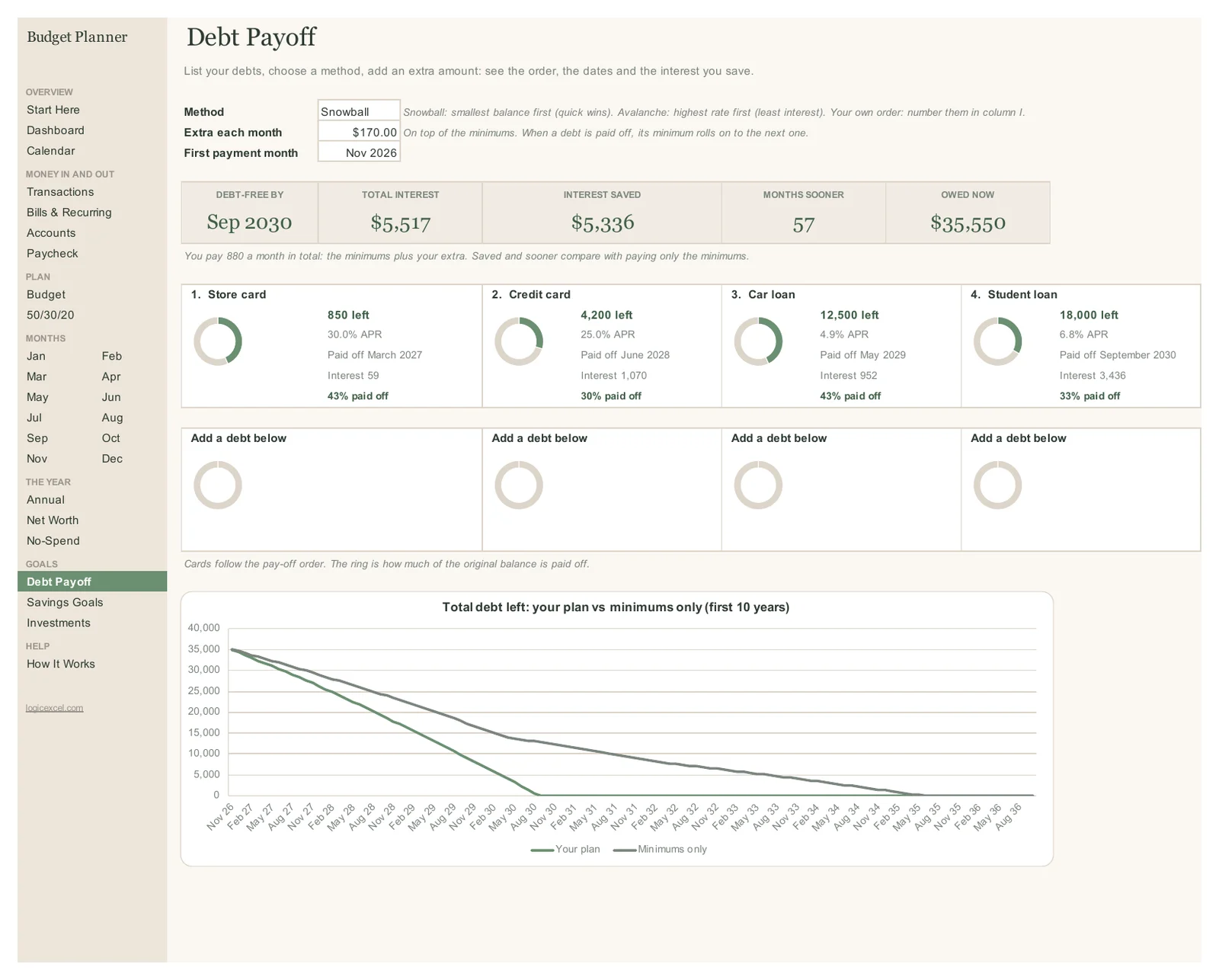
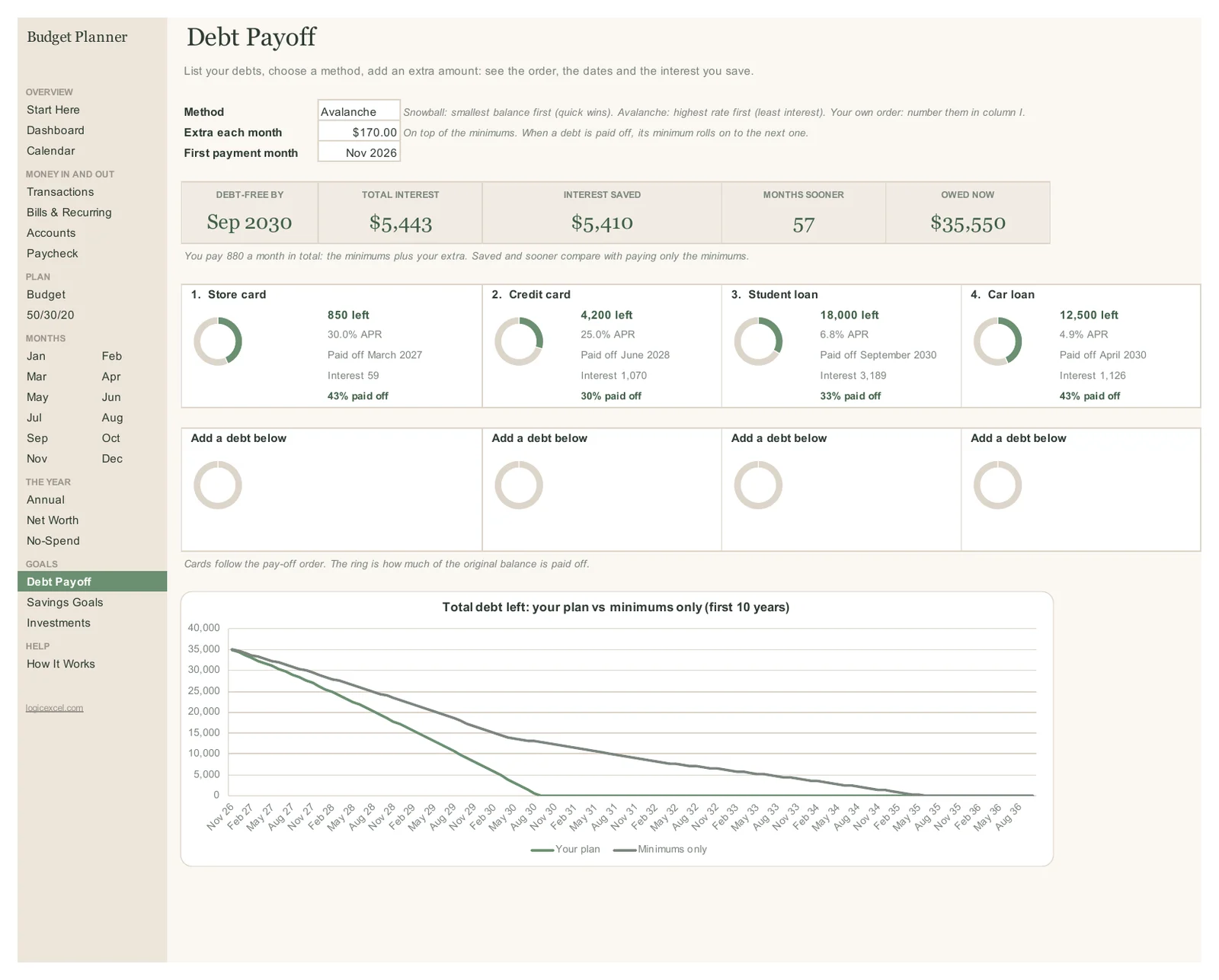
The example household owes $35,550 on four debts and pays $880 a month: $710 of minimums plus $170 extra. With the snowball they are debt-free in September 2030, after 47 months, and pay $5,516.97 in interest, against 104 months and $10,853.34 paying only the minimums. The avalanche order clears them in the same 47 months for $5,443.44, so $73.53 less, but the car loan goes in month 31 with the snowball and month 42 with the avalanche. Switch the method and every number updates, so you can see the trade for your own debts.
What you enter
For each debt: the balance, the interest rate (APR) and the minimum payment. Then the method, the extra amount each month, and the month you start. If you want a particular order, number the debts yourself and choose Your own order.
What you get back
The payoff order, how many months each debt takes and the month it is paid off, the interest on each debt with your plan and with minimums only, your debt-free date, the total interest saved, and a chart of total debt left under both.
Part of a whole budget
The debt payments live in the same planner as your budget, bills and paycheck plan, so the extra amount is money you have actually planned for. The dashboard shows your debt-free date every month.
Part of the Budget Planner · $19
Budget Planner is ready, and we are finishing the checkout. Create a free account and we will email you the moment you can buy it.
Want to start today? The Simple Monthly Budget is free.
Questions people ask
Is the debt snowball or the avalanche better?
The avalanche usually costs a little less in interest, because the highest rate goes first. The snowball pays off a whole debt sooner, and that early win keeps many people going. The spreadsheet shows both for your own debts, so you can see how big the difference really is before you choose.
How many debts can I add?
Up to 40: credit cards, store cards, car loans, student loans, personal loans or medical bills.
Can I use it as a credit card payoff calculator?
Yes. Add each card with its balance, APR and minimum payment, set an extra amount, and it shows the month each card is paid off and the interest you save.
How is the interest worked out?
Each month, interest is the balance times the yearly rate divided by 12, rounded to the cent, which is how most cards and loans charge it. Real statements can differ by a few cents.
Does it work in Google Sheets?
Yes. Upload the file to Google Drive and choose File > Save as Google Sheets.