Excel templates / Budget Templates / Budget Planner / 50/30/20 budget
50/30/20 Budget Template
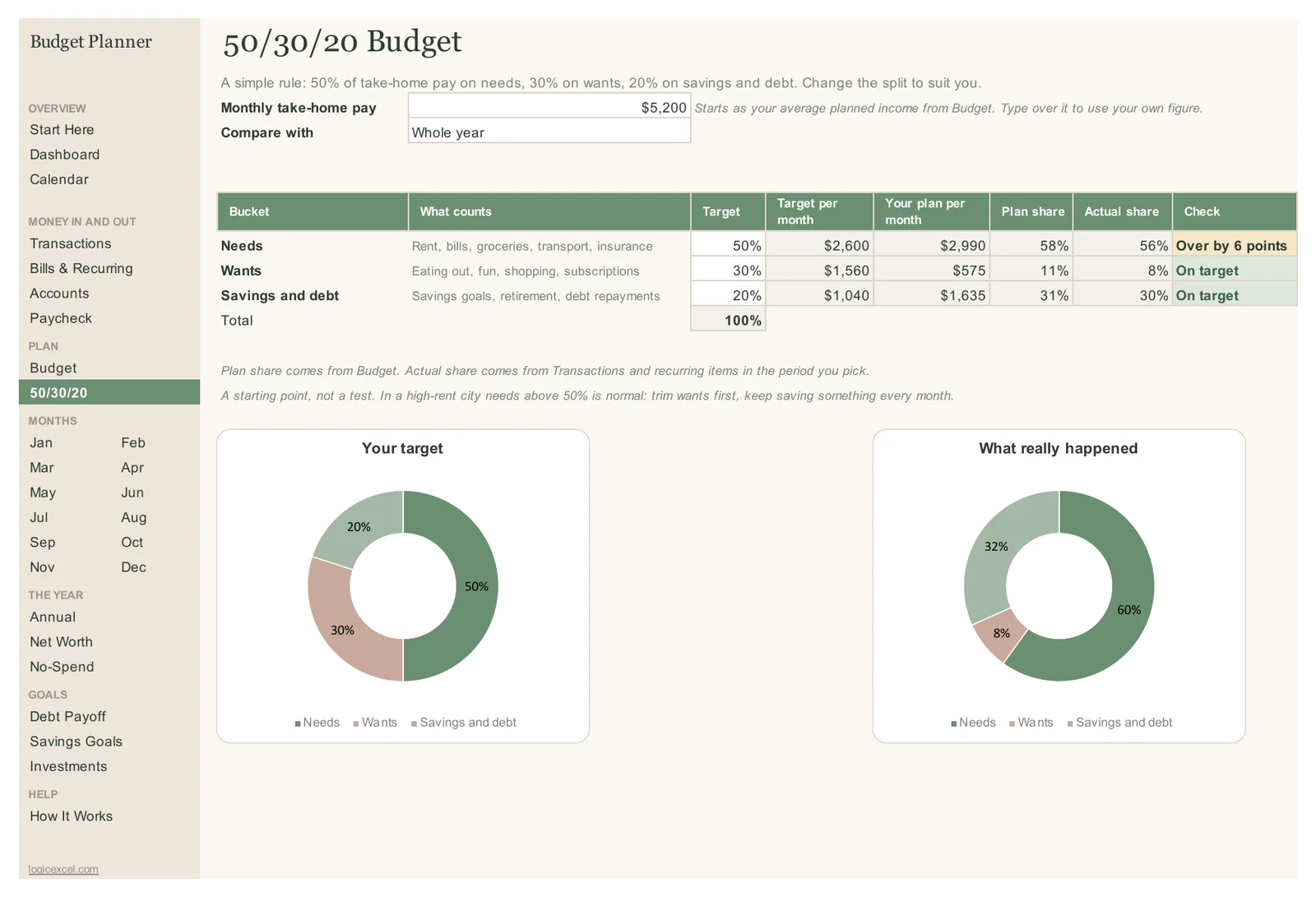
The 50/30/20 tab in the LogicExcel Budget Planner checks your budget against the 50/30/20 rule in Excel or Google Sheets: about 50% of take-home pay on needs, 30% on wants and 20% on savings and debt. It compares the rule with both your plan and what you actually spent this year, and says plainly whether each bucket is on target.
Part of the Budget Planner · $19
Budget Planner is ready, and we are finishing the checkout. Create a free account and we will email you the moment you can buy it.
Want to start today? The Simple Monthly Budget is free.
What the 50/30/20 rule is
A simple way to split take-home pay: roughly half on needs (rent, bills, groceries, transport, insurance), 30% on wants (eating out, fun, shopping, subscriptions) and 20% on savings and paying down debt. It is a starting point, not a test.
How the template applies it
Every category in your budget belongs to a group: needs, wants, savings or debt. The 50/30/20 tab adds up each group from your plan and from your actual spending, divides by take-home pay, and compares the share with the target.
Reading the example
The example household takes home $5,200 a month. Needs are planned at $2,990, which is 58%, and over the year they actually took 56%, so the check reads Over by 6 points. Wants came to 8% (planned 11%) and savings plus debt to 30% (planned 31%), both on target. With rent at $1,550 that is normal: the template's own note says to trim wants first and keep saving something every month.
Use your own figure
Take-home pay starts as your average planned income from the Budget tab. Type over it to use a different figure, and the targets update.
Part of the Budget Planner · $19
Budget Planner is ready, and we are finishing the checkout. Create a free account and we will email you the moment you can buy it.
Want to start today? The Simple Monthly Budget is free.
Questions people ask
Is 50/30/20 based on gross or take-home pay?
Take-home pay: what lands in your account after tax. That is the figure the template uses.
Where do debt payments go?
Minimum payments on debts you must pay are often counted as needs; extra payments count toward the 20%. The template puts all debt repayments in the 20% bucket with savings, which keeps the plan simple. You can change any category's group.
Can I change the percentages?
The targets are plain numbers on the tab, so you can type 60/20/20 or any split that suits you.
Is there a free version?
Yes. The free Simple Monthly Budget shows the same needs, wants, savings and debt split against the 50/30/20 guide for one month.