Free printable + Excel tracker
90-Day Savings Challenge
Three months, one cell a day, $1,000 at the end. Most days are $5 or $10, the price of a coffee and a snack, with a few $20 and $25 cells for the days you have more room.
Both are free. Tell us where to send them and they are in your inbox in a minute. The tracker adds up what you have saved and shows your finish date.
Goal
$1,000
Cells
90
Takes
3 months
Saving
about $11.11 a day
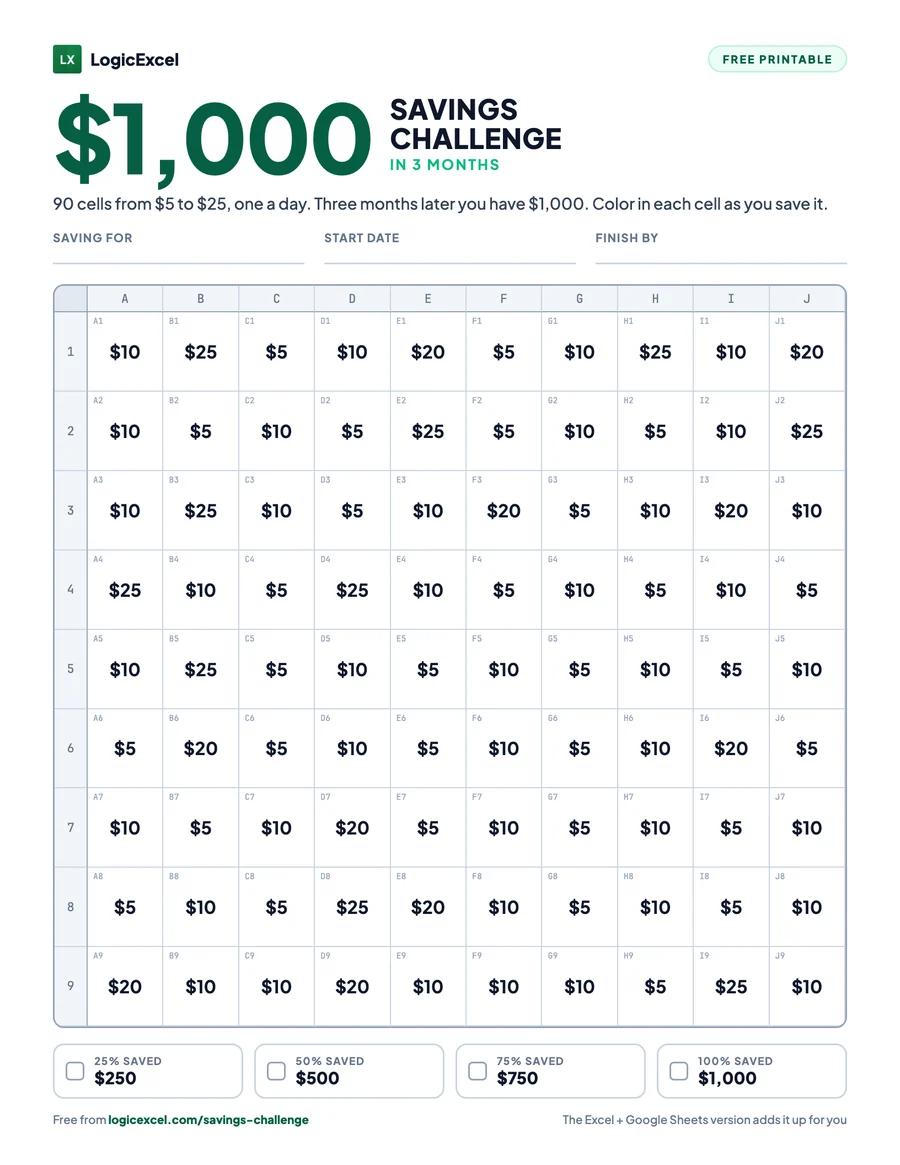
How the 90-day challenge works
A short challenge is easier to start than a year-long one, and finishing it is the best reason to start the next. Use it to build a starter emergency fund before the holidays, or to pay for them in cash.
Print it, or open the tracker
Print the chart and put it where you will see it every day, or get the free tracker for Excel or Google Sheets. Write down what you are saving for.
Color a cell each time you save
Move the money to savings, then color the cell with that amount. One a day keeps you on schedule, in any order you like.
Reach $1,000 in 3 months
Watch the chart fill up. The tracker shows what is saved, what is left and whether you are on pace, and the milestones on the chart mark each quarter of the way.
What is on the chart
90 cells, shuffled across the grid so you choose each time: 30 cells of $5, 40 of $10, 10 of $20, 10 of $25. Together they make exactly $1,000.
The free tracker adds it up for you
The same chart as a spreadsheet, for Excel and Google Sheets. Type x (or the date) under an amount when you save it: the cell turns green and the tab totals what you have saved, shows what is left, and tells you whether you are on pace and the day you will finish. It also has every other challenge, and a tab where you set your own goal and number of cells.
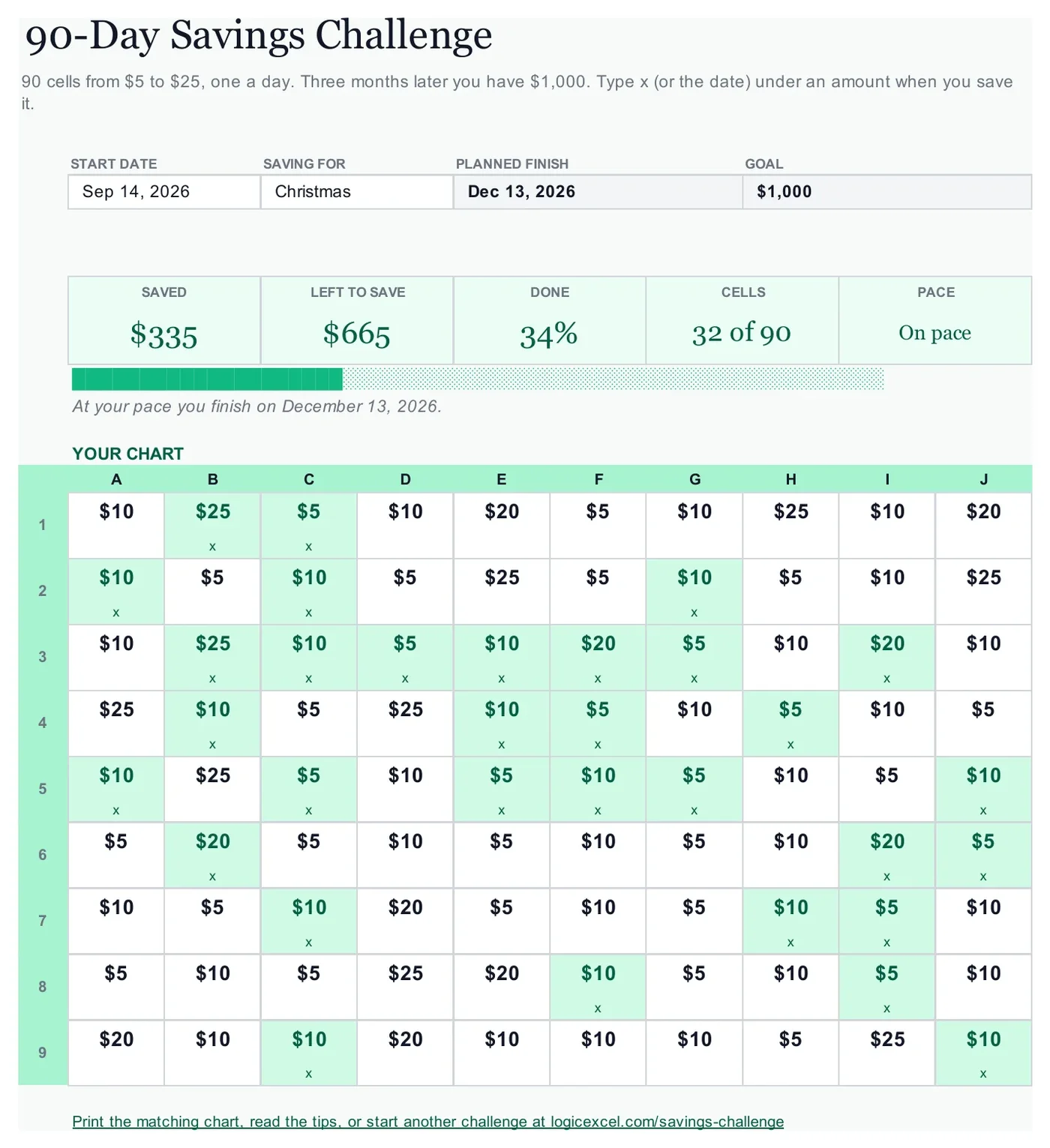
Curious how the green cells work? It is a two-minute idea: learn conditional formatting free, in a live spreadsheet in your browser.
Tips that make it stick
- Save on the day, not at the end of the week: a daily habit is the point of this one.
- Missed a day? Color two the next day, or skip ahead. The tracker counts cells, not dates.
- Move the money with your banking app as you color the cell, so the chart and the account always match.
Questions
How much is the 90-day challenge a week?
It averages about $11.11 a day. The cells run from $5 to $25, so a tight day can be a small cell and payday a big one.
Is it really free?
Yes. The printable PDF and the Excel and Google Sheets tracker are both free. We email them to you, along with a few short tips to help you finish.
Does the tracker work in Google Sheets?
Yes. Choose Google Sheets when you get the tracker, and the email has a button that makes your own copy in your Google Drive in one click. The totals, the green cells and the pace all work there. In Excel it works on Windows and Mac, in any version from 2016.
What if I miss a week?
Nothing breaks. Color any cell you like the next time you save; the order does not matter. The tracker shows how many cells you are behind and moves your finish date, so you can catch up when you have room.
Where should I keep the money?
In a separate savings account, ideally a high-yield one, so you can see the total grow and you are not tempted to spend it. Move the money as you color the cell, so the chart and the account always match.
Can I start in the middle of the year?
Yes. Write your own start date on the chart, or type it into the tracker, and the finish date and pace follow from that day.
Ready to start?
Get the chart, pick your start date, and color the first cell today.
Both are free. Tell us where to send them and they are in your inbox in a minute. The tracker adds up what you have saved and shows your finish date.
More savings challenges
$1,378
52-Week Savings Challenge
52 cells, 1 year
$1,000
$1,000 Savings Challenge
50 cells, 6 months
$5,000
$5,000 Savings Challenge
100 cells, 1 year
$10,000
$10,000 Savings Challenge
100 cells, 1 year
Biweekly
Biweekly Savings Plan
26 paydays, 1 year
Or compare all six challenges and get every printable in one PDF.